AI Timers vs. Traditional Timers: Why Adaptivity Matters for ADHD Focus
The GPS Metaphor: Navigating Focus with AI
Managing your day with a traditional timer is like planning a cross-country trip using a paper map. You get a fixed route and a general sense of direction, but if you hit traffic or take a detour, you have to recalibrate on your own. AI timers function more like a GPS, constantly processing your progress, adapting to obstacles, and offering real-time course corrections that keep you moving toward your goals.
Static vs. Adaptive: Why Personalization Matters for ADHD
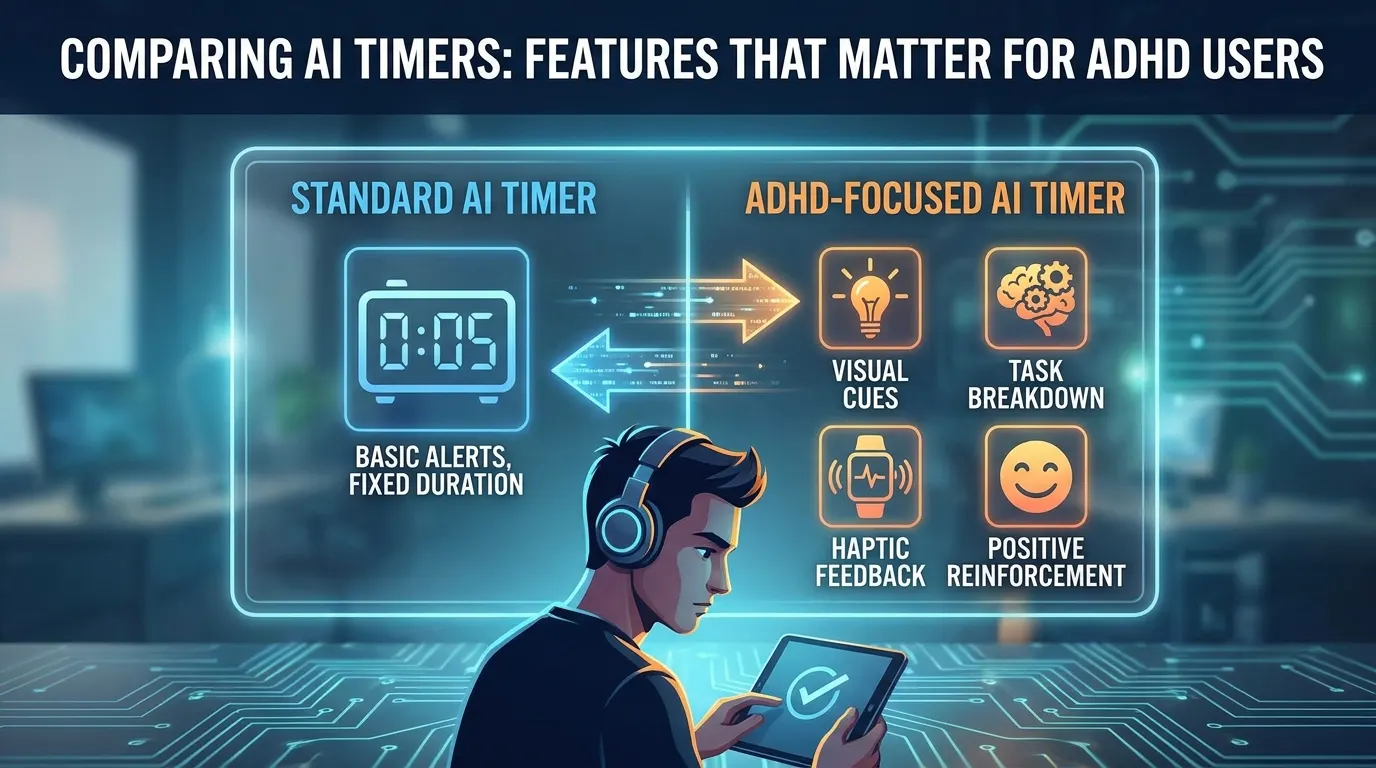
Traditional timers are static by design. You set a duration, press start, and get one alert when time runs out. There’s no consideration for how you’re actually working or whether you’re struggling to maintain focus. This approach can feel rigid, especially for those with ADHD who often need flexibility and feedback as their attention shifts.
AI timers, in contrast, adapt as you go. They learn your rhythms – when you tend to lose focus, how long it usually takes you to get back on track, and which cues help you refocus. With each session, the timer becomes more attuned to your working style, suggesting optimal break points or gently nudging you when it senses waning concentration.
Real-Time Feedback and Adjustments: A Major Win for ADHD Users
A key advantage for ADHD users is real-time feedback. An AI timer can shift work and break intervals dynamically based on your input or behavior. Many users report improved time management when reminders and scheduling adapt to them, not the other way around. If you’re consistently finishing tasks early or struggling with distractions, the timer recalibrates, offering new strategies or alert patterns.
Practically, this means you’re never stuck with a “one size fits all” solution. You can set the AI timer to offer gentle nudges, assertive reminders, or custom intervals, depending on what actually helps you focus. Over time, the tool aggregates your productivity patterns, providing insightful analytics that help you fine-tune your approach. For ADHD users who often battle inconsistency, this level of support can feel less like an alarm clock and more like a smart co-pilot.
Setting Expectations: A Nuanced Comparison
While AI timers offer a clear upgrade in terms of adaptability and feedback, not every user needs dynamic support. Some may find the ongoing notifications distracting or prefer the simplicity of a standard timer. But for those managing ADHD, the difference is substantial: AI timers provide a sense of partnership, helping you course-correct as challenges arise rather than penalizing you for every false start. As productivity tools evolve, this adaptive philosophy is quickly becoming the gold standard for anyone looking to make real progress in managing their time and focus.
Side-by-Side Comparison: Key Features of Top AI Timers for ADHD
How FocusBox and a Leading Alternative Stack Up
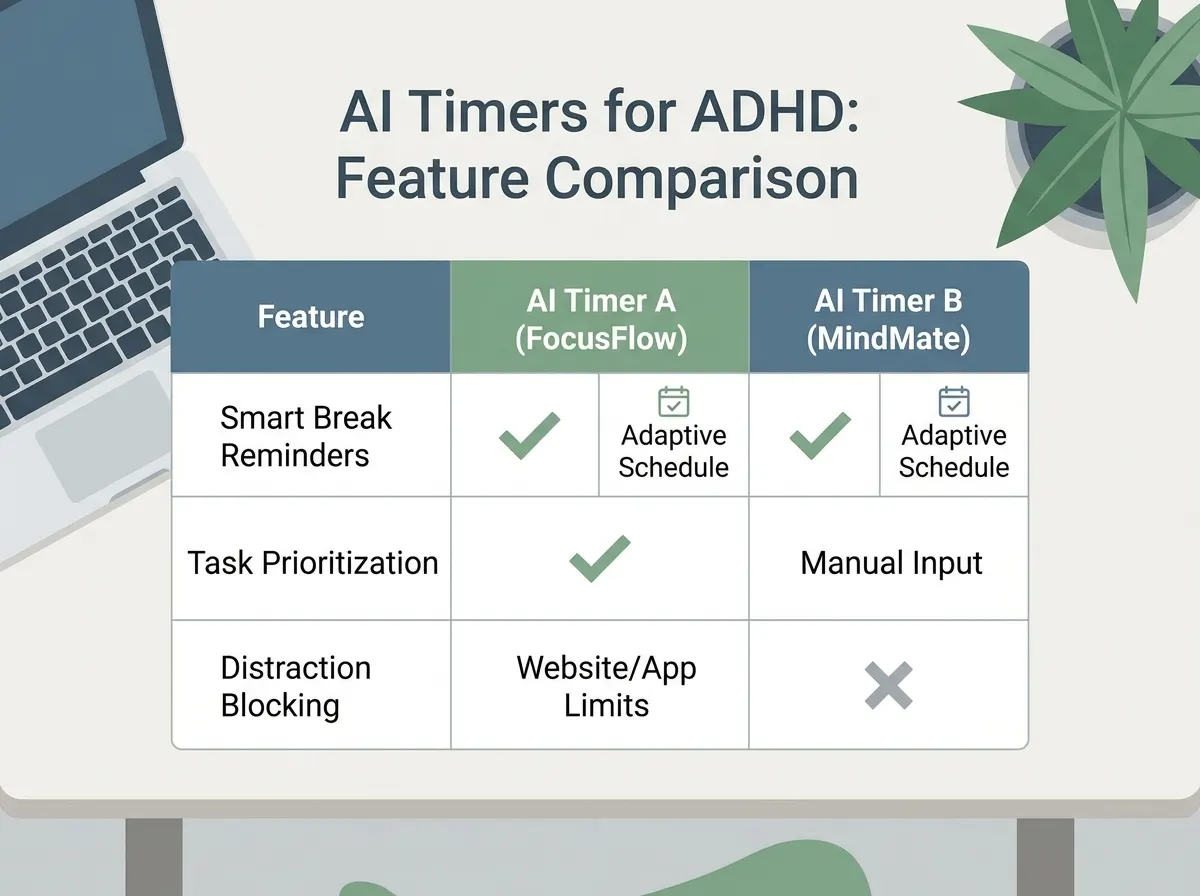
Choosing the right AI timer can make or break your productivity routine, especially for ADHD users who need structure and flexibility in equal measure. Below is a comparison of FocusBox and another prominent AI timer app, RescueTime, across six dimensions that matter most for ADHD time management. Each category reflects practical needs ADHD users commonly describe.
| Feature Dimension | FocusBox | RescueTime (Alternative AI Timer) |
|---|---|---|
| Visual and Auditory Cue Customization | Adjustable: Users can combine ambient sounds, timers, and reminders and alarms, and switch to a full-screen focus mode. | Visual progress bars and standard chimes; limited to preset alert options. Less flexibility for users who need personalized sensory feedback. |
| Adaptive Scheduling & Learning | AI time blocking plans your tasks into your day, and Pomodoro templates set work/break cycles. Reports and the energy audit help you adjust cycles to your own focus windows. | Offers general analytics and fixed Pomodoro intervals. No dynamic adjustment to individual patterns; users adjust manually. |
| Integration with Productivity Tools | Imports tasks from Todoist, Asana, ClickUp, Notion and Jira and events from Google Calendar, and generates tasks with AI, reducing duplication and manual setup. | Integrates with Google Calendar and Slack. Lacks deeper task import or export functionality; more manual copying required for complex workflows. |
| Ease of Use & Interface Design | Minimalist dashboard with large timers and clear controls. Designed for quick setup, so you can start a session fast. | Data-rich dashboard prioritizes analytics over simplicity. New users may find the interface overwhelming, particularly for quick task setup. |
| Data Privacy & Analytics | Reports focus on your focus sessions and time distribution rather than tracking all app and site usage. Check the privacy policy for how data is stored. | Cloud-based analytics track all app and site usage. Sends anonymized usage data to servers by default, which may raise privacy concerns for some. |
| Community & Support Resources | Support plus a blog with ADHD-focused guides on timeboxing and focus. | Knowledge base and ticket-based support. No dedicated ADHD community or specialized content. |
Key Differences That Matter
The most significant divergence between FocusBox and its leading competitor comes down to customization and adaptive support. FocusBox puts control in your hands with customizable cues and routines you can adjust as your reports show what works. This is critical for ADHD users who may need to shift strategies as their workday ebbs and flows. In contrast, RescueTime excels at passive data collection but offers fewer ways to actively shape your timing environment.
Integration is another area where FocusBox stands out. By importing tasks from popular productivity tools and generating tasks with AI, it minimizes the friction that often derails ADHD workflows. RescueTime covers the basics but requires more manual intervention to keep your systems in sync.
Finally, privacy-conscious users may prefer FocusBox’s focus on session data rather than tracking all app and site usage, while RescueTime’s analytics-focused approach could be a double-edged sword for those wary of cloud-based monitoring. For ADHD users, these distinctions aren’t just preferences – they can be the difference between sticking with a tool and abandoning it after a short trial.
What Makes an AI Timer ADHD-Friendly? Core Attributes Explained
AI timers have quickly become essential for people with ADHD, breaking through the limitations of old-school timers with features built for real distractions and fluctuating focus. The best ones are not just clever with time tracking – they actively address the day-to-day struggles ADHD users face: inconsistent attention, impulsive task-switching, and the constant battle to stay on schedule. NIMH lists poor time management, planning, or organization among the common symptoms of ADHD in adults.
- Customizable alerts (visual and auditory): Flexible reminders that match user preferences and sensitivity.
- Adaptive learning: Algorithms that adjust interval lengths and reminders based on real-world usage patterns.
- Distraction-blocking integrations: Connections with other apps and environments to reduce temptation and interruptions.
- Simple, low-friction interfaces: Minimal setup and navigation so users can act on impulse productively, not get lost in menus.
How AI Timers Learn and Adapt
Traditional timers treat every session the same, but AI timers use adaptive algorithms that “learn” from your work habits. If you tend to lose focus after 20 minutes, the system can start suggesting shorter sessions, or automatically tweak break intervals after noticing a slump in your afternoon productivity. This approach is rooted in real user needs.
There is little published research on adaptive timers for ADHD specifically, so treat claims of proven gains with caution. The idea is practical, though: if you repeatedly snooze or ignore a reminder, the AI can nudge you with a different style alert or recommend a break. This dynamic feedback loop is a departure from the static Pomodoro timer and directly addresses the unpredictable nature of ADHD attention spans.
If you’ve ever felt like timers either nag or abandon you, adaptive learning may be worth trying.
Not every user likes the idea of an algorithm adjusting their day. Some prefer to set strict intervals and stick to them. The best AI timers let you control how much “adaptation” you want, so the technology supports your approach, not the other way around.
The Importance of Sensory Cues
For many people with ADHD, a simple beep or pop-up doesn’t cut it. Visual and auditory cues are much more than reminders – they’re signals that help re-anchor attention in the moment. Many ADHD users say they benefit from sensory cues embedded in their productivity tools.
The idea is simple: multisensory prompts, ones you can both see and hear, are harder to miss. An AI timer with a subtle screen flash, a soft chime, or even gentle ambient sounds can break the “hyperfocus trance” without triggering anxiety. FocusBox, for instance, pairs timers and reminders with ambient sounds and a full-screen focus mode, so you can match the intensity and style to your sensitivity level.
The best AI timers let you tailor alerts and intervals to your needs. Customization is not just a nice-to-have, it’s fundamental for ADHD users who may be hypersensitive to some sounds or visuals but underwhelmed by others.
There is a flip side. For users highly sensitive to noise or visual clutter, too many cues can be counterproductive. Thoughtful AI timers provide granular controls – letting you dial alerts up or down, or mute them altogether when needed. This prevents alert fatigue and keeps the tool supportive rather than distracting.
Reducing Friction: Simplicity and Distraction Blocking
Another central feature is the simplicity of the interface. ADHD users often abandon complicated tools in favor of scribbled sticky notes, not because they lack motivation, but because every extra click or menu is an opportunity to lose momentum. The best AI timers, like FocusBox, streamline the process – quick start options, timers tied to AI to-do lists, and calendar imports. Some other tools also connect with distraction-blocking apps. This means more time focusing and less time configuring.
Distraction-blocking integrations also set top AI timers apart. By syncing with apps that mute notifications, block social media, or even dim your screen during focus intervals, these tools help reduce the friction between intention and action. You’re not just counting down, you’re actively defending your attention from digital temptation.
In sum, the most ADHD-friendly AI timers strike a balance between helpfulness and simplicity. With the right blend of adaptive learning, customizable cues, and low-friction design, these tools can support focus in a way that rigid, one-size-fits-all timers never could.
FocusBox: Strengths and Unique Features for ADHD Users
FocusBox stands out in the crowded productivity space by addressing the real-world friction points that ADHD users face. Instead of layering on complexity, it builds the essentials right into the core workflow – AI to-do lists connected to intuitive timers, ambient focus aids, and feedback loops for self-optimization. This isn’t just another Pomodoro app with a fresh coat of paint; it’s a tool designed to help you shift from scattered, reactive work to structured, sustainable focus – without requiring you to read a manual or tinker with endless settings.
AI To-Do List Integration
Forget the blank slate problem. FocusBox brings AI-powered task generation directly into your flow. Start typing a project, and the AI suggests concrete, actionable steps – removing the initial friction of figuring out where to begin. For ADHD users, this means less time lost to decision paralysis and more immediate momentum. The integration isn’t limited to basic lists: FocusBox’s AI can break down fuzzy goals into manageable sprints, then link each to the timer function so you stay anchored to the task at hand.
Ambient Sounds and Pomodoro Cycles
FocusBox leans into ambient soundscapes – think gentle rain or white noise – and built-in Pomodoro cycles that are fully customizable. No more scrambling to find a separate white noise app or fiddling with timer intervals. The result: a more cohesive environment that encourages you to enter, and stay in, a productive state.
Ultra-Simple Setup and Onboarding
One of the most overlooked barriers for ADHD users is the cognitive load of onboarding. FocusBox trims setup to the bare minimum – no labyrinth of menus, no required integrations. You can literally start a session in seconds. For people who are easily overwhelmed by too many choices, this simplicity is not just a feature, but a necessity.
Feedback and Analytics for Self-Optimization
Where most productivity apps stop at counting sessions, FocusBox delivers actionable feedback. Its reports, productivity insights and energy audit show when you focus best and where your time went, making it easier to spot patterns and iterate on your own routines.
Before/After: FocusBox in Action
| Before (Generic Workflow) | After (FocusBox Workflow) |
|---|---|
| • Open a notes app, try to list tasks, get overwhelmed by a blank page. • Set a generic timer, lose track of what to do next. • Hop between browser tabs for white noise, Pomodoro, and to-do lists. • Finish the day unsure of what was actually accomplished. | • Type a project into FocusBox, receive an AI-generated list of actionable steps. • Pick a Pomodoro template with built-in ambient sound and start the timer. • Check the energy audit to see when you focus best. • Review your reports, adjust tomorrow’s plan based on what worked. |
Why does the FocusBox approach work better? The weak workflow forces you to context-switch, make micro-decisions, and assemble your toolkit from scratch – each step introduces new opportunities for distraction. The FocusBox workflow is frictionless: setup vanishes, structure is built-in, and your attention goes to the work itself. For ADHD users, this difference isn’t cosmetic; it’s the difference between finishing the day frustrated and finishing with a clear sense of progress.
AI timers are becoming more sophisticated, but FocusBox’s advantage is how it combines these core features into a single, ADHD-friendly experience. It won’t replace your need for breaks or self-awareness, but it will give you a reliable foundation – so you can start strong, keep momentum, and learn what actually works for you.
Alternative AI Timers: Where They Shine for ADHD Users
Not every ADHD workflow fits neatly into the same box. FocusBox offers a streamlined experience, but for some users, alternative AI timers bring a different set of strengths – especially where technical integration, granular scheduling, or specialized analytics matter most. For ADHD users who want more than a simple focus timer, these alternatives can open new possibilities for automation, insight, and control.
Deep Integrations with Smart Home and Virtual Assistants
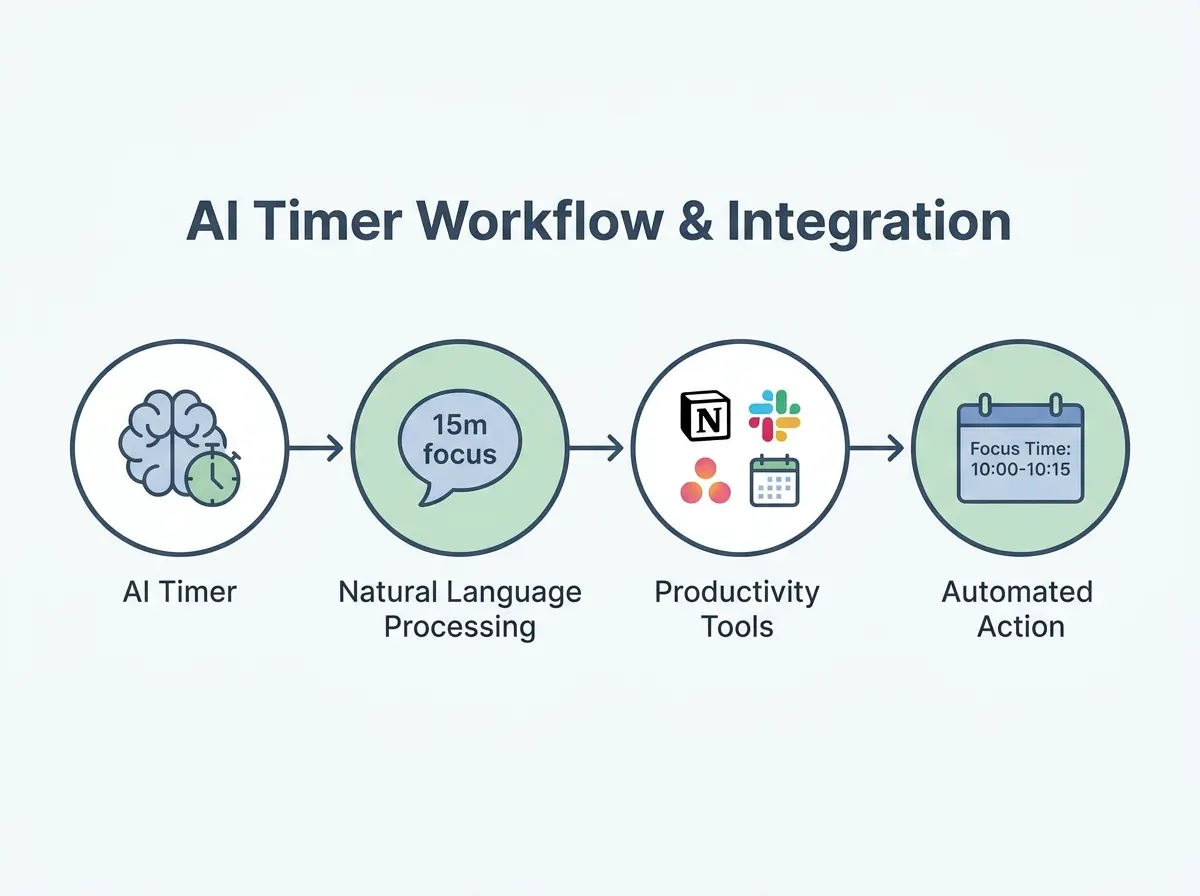
One area where alternative AI timers clearly pull ahead is in integrating directly with smart home systems and virtual assistants. For users who already rely on voice commands or connected devices, the ability to say “start a 25-minute focus session” to Alexa or Google Assistant adds a layer of effortless accessibility. This can be crucial for ADHD users who may struggle with manual setup or app switching. Voice integration means you can trigger, pause, or adjust timers hands-free while cooking, working, or moving around the house – a practical boost for those who need flexible structure throughout the day.
These integrations also go beyond basic commands. Some AI timers can automate environmental cues – like dimming smart lights or triggering white noise when a session starts. For those who respond well to multisensory cues, these features reinforce transitions between tasks.
Advanced Analytics and Reporting
While FocusBox covers the essentials, alternative AI timers sometimes offer deeper analytics and reporting capabilities. For users who want to identify productivity patterns or dig into their own behavioral data, these tools can break down performance by time of day, activity type, or even mood (if tracked via integrations). This kind of feedback helps ADHD users spot trends – maybe evenings are consistently less productive, or short breaks yield better focus than long ones.
Adaptive learning and personalized feedback may help with time management. Advanced AI timers support this by learning your habits and surfacing actionable insights, such as suggesting new intervals or highlighting periods of peak focus.
More Granular Control Over Scheduling
Another key strength is granular scheduling. Some alternative AI timers allow for intricate setup – think custom intervals, variable alert tones, and even stacking multiple timers for complex routines (like a “work-break-exercise” sequence). For ADHD users balancing multiple projects, or those whose days don’t fit standard blocks, this flexibility can be a lifesaver. It allows for fine-tuning of reminder frequency, break duration, and notification style, all tailored to individual responsiveness or energy patterns.
Specialized Features for Complex Workflows
Alternative solutions also stand out when it comes to supporting complex workflows. For example, some timers integrate with project management apps, enabling automatic timeboxing of tasks as they are scheduled. Others connect with wearable devices to track physiological feedback (like heart rate), using the data to suggest when to switch tasks or take a break. These specialized features cater to ADHD users who work in dynamic, high-stakes environments and require both structure and adaptability.
When Alternative AI Timers Enable Better Customization
There are specific scenarios where the added flexibility of alternative AI timers makes a noticeable difference. For example:
- Home-based freelancers who already use smart lighting or speakers can synchronize their focus sessions with environmental changes, reinforcing routines without manual intervention.
- Students juggling classes, assignments, and extracurriculars can set up intricate schedules that adapt to daily changes, rather than sticking to rigid time blocks.
- Professionals managing multiple clients or projects often need to switch between deep work, meetings, and quick check-ins. The ability to program unique intervals for each context prevents the timer from becoming just another distraction.
For ADHD users who crave options – and who aren’t overwhelmed by extra settings – these alternative AI timers provide the customization and integration that can make all the difference. The best choice depends on your needs: if you thrive on automation and data, or want your productivity tools to sync with every aspect of your digital life, looking beyond FocusBox might be worth it.
When an Alternative AI Timer is the Better Choice
When Voice-Activated Controls Are Non-Negotiable
Some users need hands-free operation above all else. If you routinely work in environments where typing or clicking is a distraction – say, while cooking, exercising, or managing kids – a timer with deep integration into virtual assistants like Alexa or Google Assistant is essential. While most AI timers offer basic voice triggers, there are options that let you customize commands, chain routines, or receive spoken analytics. For those who rely on accessibility tools or prefer talking to their tech, this level of voice control can be a dealbreaker.
When You Want Highly Detailed Analytics
FocusBox keeps analytics digestible, which works for many. But there are scenarios where you need more: granular breakdowns of your productivity patterns, minute-by-minute visualizations, or exportable CSVs for further analysis. For instance, a productivity coach might want to identify exactly when attention dips during a session, or a researcher may need to aggregate timer data across a team. Some AI timers offer rich dashboards and advanced reporting tools, letting you slice and dice the data however you want.
When You Have Niche Integration Requirements
If your work ecosystem includes smartwatches, enterprise task managers, or custom workflow tools, not every timer will fit the bill. For example, a developer who tracks tasks via Jira, logs hours with Toggl, and uses a smartwatch for reminders will need a timer that plugs into all those systems. Certain AI timers focus on extensive integration options, supporting everything from Slack notifications to automated entries in enterprise calendars. This can make them a better fit for users with complex or highly specific tech stacks.
When Customization and Open Source Matter
For those who want to tweak every element of their workflow, open-source AI timers offer a level of flexibility you just can’t get from most commercial tools. Maybe you want to modify the algorithm that determines break intervals, add unique notification sounds, or even contribute to the underlying code. If you’re technically inclined and privacy-conscious, the ability to self-host and customize is a major draw. Open-source options are gaining traction among developers and tech-savvy ADHD users who value complete control over their time management setup.
The bottom line: while FocusBox is designed to make AI-driven time management accessible and ADHD-friendly, you might find greater value in an alternative AI timer if your needs center on voice-first controls, detailed analytics, deep integrations, or open-source flexibility. It’s worth considering what features are genuinely essential to support the way you work.
Decision Framework: How to Choose the Right AI Timer for ADHD
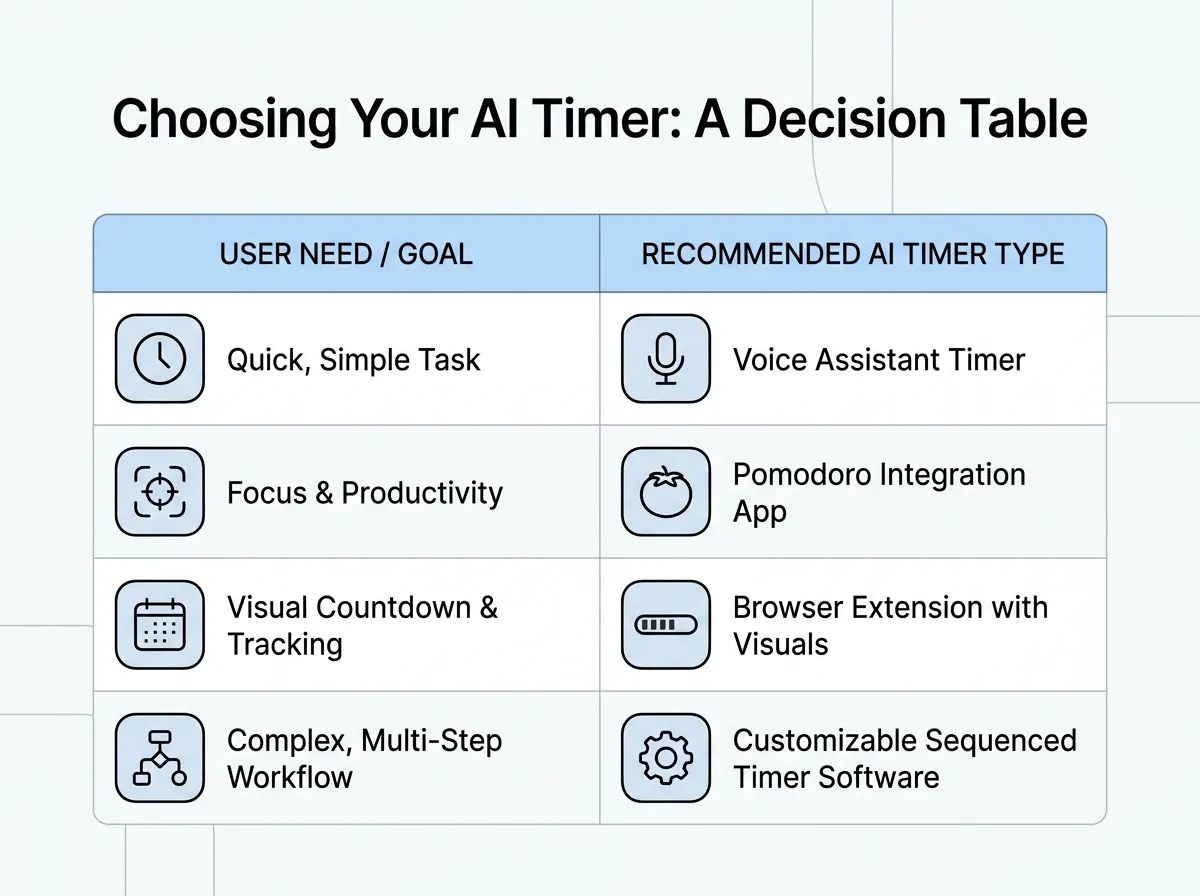
Choosing an AI timer for ADHD is more nuanced than picking the tool with the longest feature list. The best fit depends on your individual challenges, daily routines, and how you respond to certain cues and reminders. Below, you’ll find a structured decision table, clear checklists for both FocusBox and alternatives, and guidance for a hybrid workflow that can maximize benefits across different situations.
| Decision Criteria | Choose FocusBox | Choose Alternative |
|---|---|---|
| Need AI-generated to-do lists for task clarity | FocusBox generates and organizes tasks with context-sensitive suggestions | Alternative lacks automated task creation or offers only basic checklists |
| Require customizable Pomodoro timers with ADHD-friendly intervals | Offers Pomodoro and flexible timeboxing, tuned for focus and restoration | Alternative uses fixed timer intervals or lacks ADHD-focused presets |
| Benefit from built-in ambient sounds to reduce distractions | Built-in ambient sound options for sensory regulation | No soundscape support, or requires third-party integrations |
| Need adaptive reminders that learn your patterns | Reminders and alarms you set to fit your day | Static reminders that do not tailor notifications to user behavior |
| Prefer strong integration with voice assistants | Not supported: FocusBox runs on the web and iPhone/iPad | Some alternatives support Alexa or Google Assistant for hands-free control |
Choose FocusBox if:
- You need more than just a timer. FocusBox’s AI-generated to-do lists are invaluable when executive function hurdles make task initiation a struggle. If you routinely face blank-page paralysis, the context-aware suggestions can break inertia.
- You rely on visual and auditory cues to maintain attention. If these cues help you, FocusBox delivers them through timers, reminders and built-in ambient sounds. If soundscapes or visual timers are essential for you, this tool stands out.
- You want reminders you can tune to your habits. FocusBox’s reminders and alarms can be set to fit your day, which helps you avoid notification fatigue while still keeping you on track.
- You value a single app for both timeboxing and task management. FocusBox eliminates the need to juggle multiple tools by combining AI to-do lists, timers, and focus aids in one place.
Choose an Alternative if:
- You only need a simple timer without task management. If to-do lists, analytics, or adaptive features feel distracting or unnecessary, a minimalist alternative will keep you focused without extra layers.
- You require extensive third-party integrations. If your productivity stack revolves around project management tools like Trello, and you want deep, automated two-way syncing, some alternatives offer richer integration ecosystems (FocusBox imports tasks from Todoist, Asana, ClickUp, Notion and Jira).
- You’re sensitive to frequent alerts. For users who find adaptive reminders intrusive, a basic timer with customizable but static notifications offers more control over interruptions.
- You want open-source or privacy-first tools. If data privacy is your top concern, and you prefer to self-host or use open-source software, look for alternatives that prioritize local data storage or transparent codebases.
- You have a highly specialized workflow. For example, advanced analytics, detailed reporting, or unique time structures (like interval training) may be better served by niche alternatives designed for those needs.
Combining Both: A Hybrid Workflow
For many with ADHD, a hybrid approach – using FocusBox alongside an alternative – delivers the best of both worlds. For example, you might rely on FocusBox for its AI-generated task lists and Pomodoro timers during your most distracted hours. During collaborative work or when managing complex projects, you may switch to an alternative that tightly integrates with your team’s project management tool or offers specialized analytics.
This method can also mitigate tool fatigue and notification overload. By assigning each app a distinct role (task initiation vs. deep work timing, for example), you avoid redundancy and maximize the unique strengths of each system. Hybrid workflows are particularly effective if your needs shift throughout the week – using FocusBox for solo focus sprints, and an alternative for meetings or shared projects.
Recognize that no single AI timer fits all ADHD profiles. The real value comes from matching features to your context and being willing to adjust your toolkit as your needs evolve.
Limitations, Caveats, and What AI Timers Can’t Do
Alert Fatigue: When Helpful Nudges Become Distractions
AI timers are loaded with customizable alerts and reminders, but for some ADHD users, these features can backfire. Visual and auditory cues help many users maintain focus – yet too many notifications create alert fatigue. Over time, frequent pings and prompts may start to blend into background noise or even trigger anxiety. If every task, break, and progress update triggers a sound or pop-up, the very tool designed to support focus can become a source of distraction.
No Substitute for Behavioral Strategies
While adaptive learning and AI-driven recommendations feel personalized, these systems are not a replacement for core behavioral strategies. Relying solely on technology to manage time can lead to over-reliance on external cues, which may undermine the development of intrinsic skills like self-monitoring and self-initiated transitions. For example, if you can only start a task when an app tells you to, that dependence can be limiting in real-world situations where tech isn’t always available or appropriate.
Limits of AI Predictions and Adaptation
AI timers analyze patterns and suggest intervals based on past behavior, but these adaptive algorithms have real blind spots. They cannot fully account for unpredictable factors – unexpected meetings, mood swings, or changes in medication. For some users, the system’s suggestions may feel off-base, especially in rapidly shifting work environments. Even when adaptive features help, these tools are not infallible and can occasionally reinforce unhelpful routines if not reviewed critically.
Privacy and Data Sensitivity
AI timers collect usage data to provide personalized feedback, raising important privacy considerations. Sensitive details about your routines, productivity, and even health-related patterns could be stored or analyzed. Many productivity apps, including FocusBox, are mindful of these concerns, but it’s important to check what data is collected, how it’s stored, and who can access it. For those especially concerned about privacy, relying entirely on cloud-based AI solutions might not be comfortable or appropriate.
AI timers are powerful tools for ADHD support, but they work best when combined with self-awareness, adaptive strategies, and honest evaluation. The key is to use them as one piece of a broader toolkit, not as a one-size-fits-all solution.
Before and After: Real-World Usage Patterns with AI Timers
How AI Timers Change Daily Routines
Many people struggle with task completion and constant context-switching, especially those managing ADHD. A typical day before adopting AI timers can look scattered and stressful. After integrating these adaptive tools, the contrast can be stark, with improvements in focus, completion rates, and even mood.
| Before (Without AI Timers) | After (With AI Timers) |
|---|---|
| Low task completion: You start multiple tasks but finish fewer. To-dos pile up by the afternoon. Frequent context-switching: Email, chat, and meetings interrupt deep work frequently. Stress and frustration: By mid-afternoon, you feel mentally drained, frustrated with your lack of progress. | Increased completion: With AI timers and visual/auditory cues, you finish more of your planned tasks. Reduced context-switching: Smart alerts prompt you to return to focus after each scheduled break. Improved mood: The sense of accomplishment and structured breaks leave you calmer and more energized. |
Before/After Example: Weak vs. Strong Workflow Change
-
Weak Example (Generic):
Before: “I used to get distracted a lot and didn’t finish my work on time.”After: “Now I use AI timers and get more done.”
-
Specific Example (Strong):
Before: “Each morning, I’d make a to-do list in my notebook. By noon, only one task was complete because Slack and email kept pulling my attention. I felt guilty about unfinished work and anxious by the end of the day.”After: “Now, FocusBox breaks my day into 25-minute focus sprints with three-minute breaks. When I get stuck, I ask the AI to break the task into smaller steps. I see clear progress as each task gets checked off, and I finish most of my daily list. My stress is way down – I actually look forward to work blocks because I know I’ll get real breaks.”
The strong example spells out concrete workflow changes: time-blocked sessions, dynamic task suggestions, and a visible impact on completion rates and mood. It moves beyond vague claims and shows how AI timers, especially those built for ADHD like FocusBox, provide more than just a countdown – they deliver personalized structure and positive feedback loops.
What the Research Confirms
There is little published research on AI timers for ADHD specifically. The closest evidence is on structured breaks: in a 2023 study of 87 university students, those given systematic Pomodoro-style breaks reported less fatigue and distractedness and more concentration and motivation than students who chose their own breaks. That study did not look at ADHD, so treat it as a pointer rather than proof.
Switching to AI timers isn’t just a minor tweak – it can mean the difference between ending each day feeling behind, or closing your laptop with a sense of progress and calm. For anyone seeking concrete improvement in daily workflow, the “after” scenario is within reach.
Expert Insights: What ADHD Professionals and Users Recommend
The Value of Personalization
For ADHD, personalization isn’t a luxury; it’s essential. Adaptive feedback that tunes reminders and intervals to each person’s attention rhythms, and customizable alerts, are what set these tools apart from one-size-fits-all timers.
Many ADHD users say that visual and auditory cues help them stay on task. Good AI timers, including FocusBox, let you adjust reminders and alarms so support feels helpful instead of intrusive.
Balancing Technology and Self-Management
Both clinicians and experienced users agree that AI timers work best when paired with self-awareness. While adaptive learning features can surface productivity patterns and prime you for success, over-reliance on tech risks stalling the development of internal time-management skills.
Practical users often suggest checking analytics only weekly, then making small tweaks, rather than letting the app dictate your every move. The goal is for technology to nudge, not control, your routine.
Flexibility in Routines
The most trusted recommendation from both ADHD professionals and users is to keep routines flexible. Life with ADHD is unpredictable. Even the smartest AI timer can’t forecast every distraction or mood shift. That’s why the best tools – FocusBox included – let you change intervals, reset sessions, or pause reminders as needed, without penalty.
Ultimately, AI timers should fit around you, not the other way around. When chosen thoughtfully and used with self-compassion, they become an ally, not a crutch, for building more sustainable productivity habits.
Frequently Asked Questions
How do AI timers help ADHD users manage focus?
AI timers go beyond simple countdowns. For ADHD users, maintaining focus is often the hardest part of getting things done. Modern AI-driven timers rely on customizable visual and auditory cues – such as flashing screens, gentle chimes, or spoken reminders – because many ADHD users find these cues helpful for staying on track. Rather than a generic alarm, the timer adapts to the way you work, nudging you back on task if you get distracted or suggesting a break if your attention dips.
What makes AI timers different from standard Pomodoro timers?
The classic Pomodoro timer is rigid: 25 minutes on, 5 minutes off. AI timers, in contrast, use adaptive learning to personalize these intervals based on your real work patterns. For example, if you consistently lose focus 20 minutes into a task, the timer may recommend shorter cycles or prompt a quick stretch. These tools also integrate with calendars, to-do lists, and virtual assistants, allowing for a more flexible approach to productivity. You get reminders that fit your day, not just a fixed schedule.
Can AI timers really adapt to individual needs?
Some can. Adaptive learning is a standout feature. Over time, the timer tracks how long you stick with tasks, which types of alerts you respond to, and when you’re most likely to need a break. The timer’s suggestions improve as it learns from your habits. This level of personalization is a major leap from traditional timers.
Are there risks of relying too much on AI timers?
There are some trade-offs. For a subset of users, frequent alerts can feel intrusive or even increase anxiety, especially if sound cues are too aggressive. Others may find themselves leaning too heavily on the technology and not developing their own internal sense of timing. It’s sensible to pair AI timer use with other time management strategies – such as paper planners or peer check-ins – to avoid overdependence.
How do I pick the right AI timer for ADHD?
Start by identifying which features matter most to you: visual cues, sound options, calendar integration, or adaptive intervals. If possible, try a few different apps that offer free trials or demos. Look for options with custom alert settings – so you can choose whether to get gentle nudges, block distracting apps, or have interval lengths adjusted automatically. Feedback from ADHD professionals and user communities is also valuable; peer reviews often surface practical issues that don’t show up in marketing materials.
Do AI timers work well with other productivity tools?
Most modern AI timers are built to integrate with popular task managers, digital calendars, and voice assistants. For instance, you can automatically pull tasks from your to-do list, sync work blocks to your digital calendar, or use voice commands to start a session. This makes it easier for ADHD users to keep everything connected, reducing the friction of switching between apps.
Are AI timers suitable for everyone with ADHD?
No tool fits every person. Some users prefer analog solutions or find that digital reminders are too stimulating. Others benefit tremendously from the structure and analytics that AI timers provide. Ultimately, the best approach is to try a timer for a week or two, monitor how you feel, and make changes as needed. The flexibility and adaptability of these tools is their main strength, but personal fit still matters most. A timer is not a treatment for ADHD; a clinician can help you build a wider plan.
AI timers have opened up new possibilities for ADHD users to manage their time more effectively, but they work best when tailored to the individual. Experiment, adjust settings, and combine them with other strategies for the greatest benefit.
Sources
- ADHD: What You Need To Know (NIMH)
- Understanding effort regulation: Comparing ‘Pomodoro’ breaks and self-regulated breaks (Biwer et al., 2023)
Made with PostNext tool