Effortlessly Manage Multiple Projects with FocusBoxAdd and Manage Multiple Boxes for Better Project Management
As a project manager, you're constantly juggling multiple projects and tasks at once. But with so much going on, it can be easy to lose track of important details and deadlines.
Benefits for Project Managers
Organized, Efficient, Productive, Collaborative, Successful
Add and Manage Multiple Boxes for Better Project Management
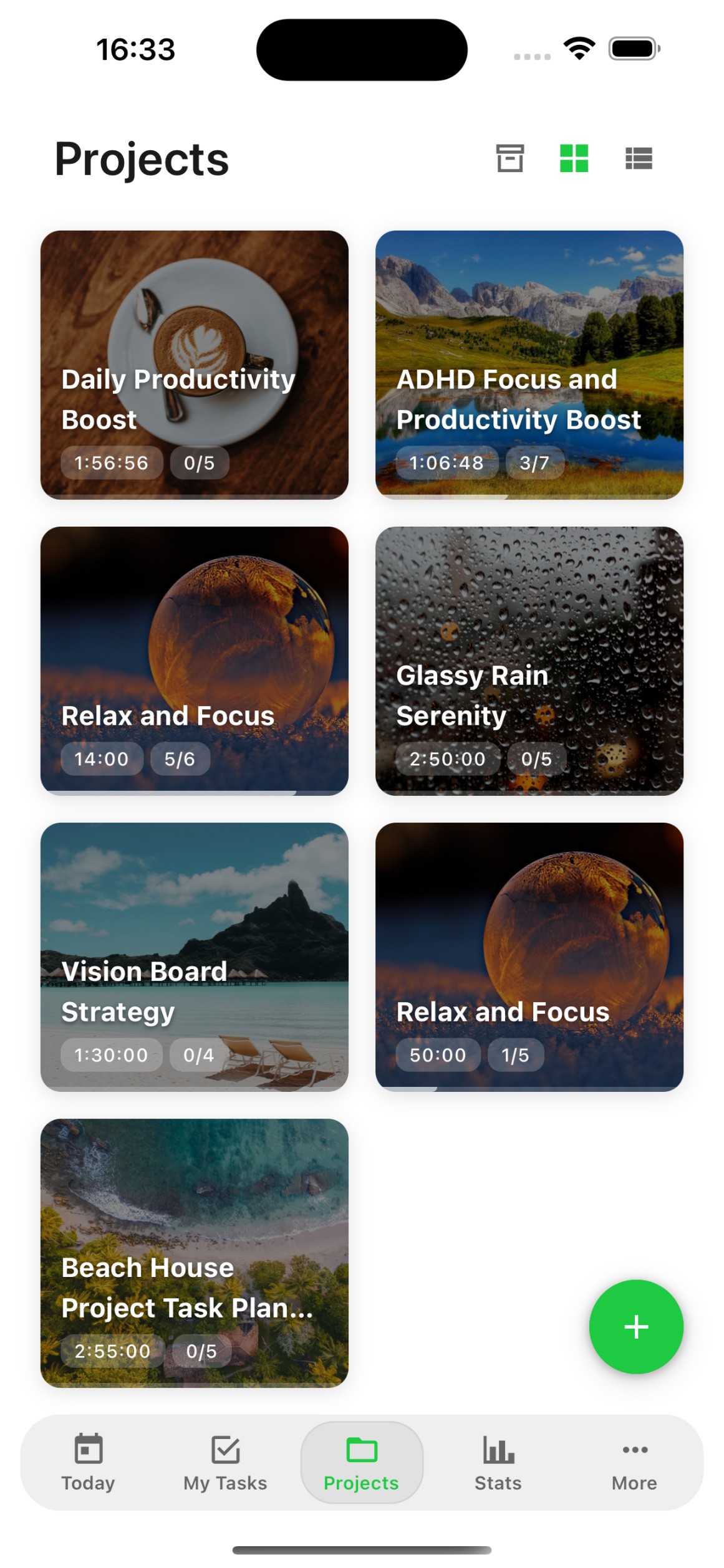
Effortlessly Manage Multiple Projects: "Stay on Top of Every Detail"
Add and manage multiple boxes to keep track of important tasks and deadlines.
Customize Your Boxes: "Stay Organized"
Customize boxes by changing background colors, images, adding descriptions, and notes for better organization.

How FocusBox Can Help You Organize and Execute Projects More Efficiently
Benefits for Project Managers
Organized, Efficient, Productive, Collaborative, Successful
Add and Manage Multiple Boxes for Better Project Management
Duplicate Boxes: "Save Time"
Easily duplicate boxes to save time on repetitive tasks and streamline your workflow.
Save Boxes as Templates: "Reuse and Repurpose"
Save your boxes as templates for re-usability, ensuring consistency across projects and tasks.


Frequently Asked Questions
What are Boxes in FocusBox?
Boxes are project containers that let you organize related tasks together. Each Box can have its own name, background color or image, description, and notes. Use them to manage multiple projects efficiently.
How many Boxes can I create?
Free plan users can create one Box and complete one task in total. Pro allows unlimited Boxes, giving you full flexibility to organize all your projects.
Can I customize Box backgrounds?
Yes! Each Box can have a custom background color or image. This visual customization helps you quickly identify different projects and makes your workspace more personal.
Can I save Boxes as templates?
Yes. Save any Box as a template to reuse for recurring projects. Templates preserve your tasks, subtasks, and settings, saving you time on repetitive project setup.
Can I duplicate a Box?
Yes. Duplicate any Box with all its tasks and settings to quickly create similar project setups. This is useful for recurring projects or when starting a new project based on an existing one.
Can I add notes to a Box?
Yes. Each Box has a notes field where you can add project-level information, instructions, links, or context. Notes are visible when you open the Box, keeping important details at hand.
Can I reorder Boxes?
Yes. Drag and drop Boxes to reorder them on your dashboard. Put your most active projects at the top for quick access.
Do Boxes sync across devices?
Yes! All your Boxes and their tasks sync automatically between the web app and iOS app. Access your projects from any device with everything up to date.
Start for free. No credit card needed.