Reports to analyzepast work sessions.
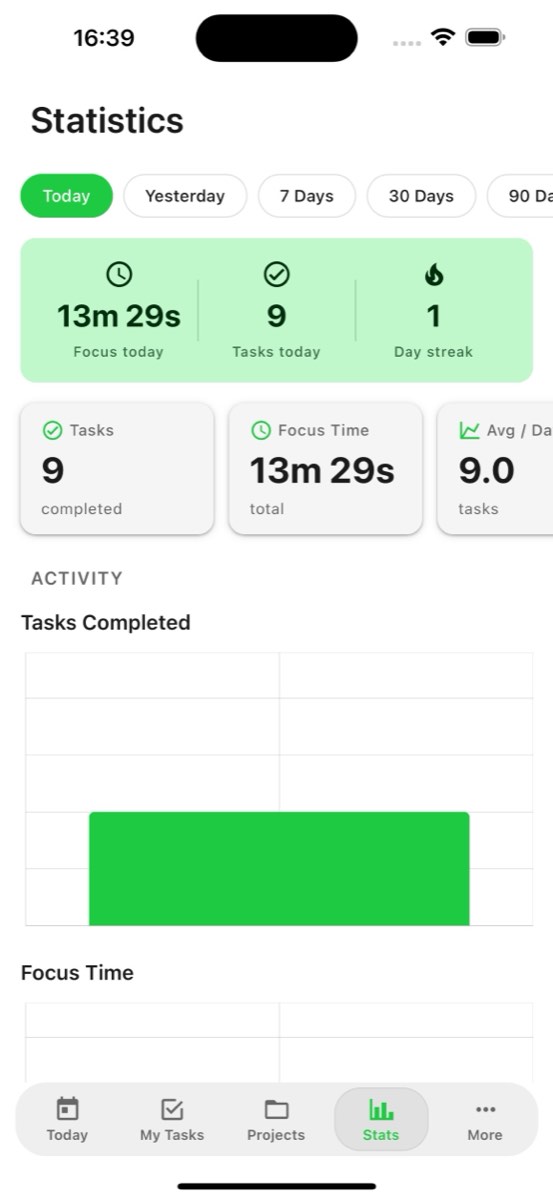
With Reports Dashboard you gain the ability to understand your daily, weekly completed tasks, work patterns, understand interruptions.
- Free plan, no card needed
- Web and iPhone, always in sync
- Built for ADHD brains
Frequently Asked Questions
What reports does FocusBox provide?
FocusBox provides reports on completed tasks, focus time, productivity trends, daily and weekly summaries, and task completion rates. These reports help you understand your work patterns.
How do I access my reports?
Click on the Stats or Reports section in FocusBox. You will find visual charts and summaries of your productivity data. Reports update automatically as you complete tasks.
Can I export my reports?
Yes. FocusBox allows you to view and analyze your productivity data. Use the insights to optimize your schedule, identify peak productivity hours, and improve your work habits.
What time periods do reports cover?
Reports can show daily, weekly, and monthly views. Track your productivity over time to identify trends, patterns, and areas for improvement in your work routine.
How do reports help improve productivity?
Reports reveal when you are most productive, how long tasks actually take versus estimates, and where your time goes. Use these insights to plan better, set realistic goals, and build better habits.
Can I see reports on the mobile app?
Yes. FocusBox productivity reports are available on the iOS app. Check your stats on the go and stay motivated by tracking your progress from anywhere.
Do reports track team productivity?
FocusBox team features allow tracking team productivity alongside individual reports. See how your team is performing and identify opportunities for improvement.
Are reports available on the free plan?
Basic reports are available on all plans. Premium plans unlock advanced analytics, longer history, and more detailed insights into your productivity patterns.