Productivity for Busy ProfessionalsTake Control of Your Time
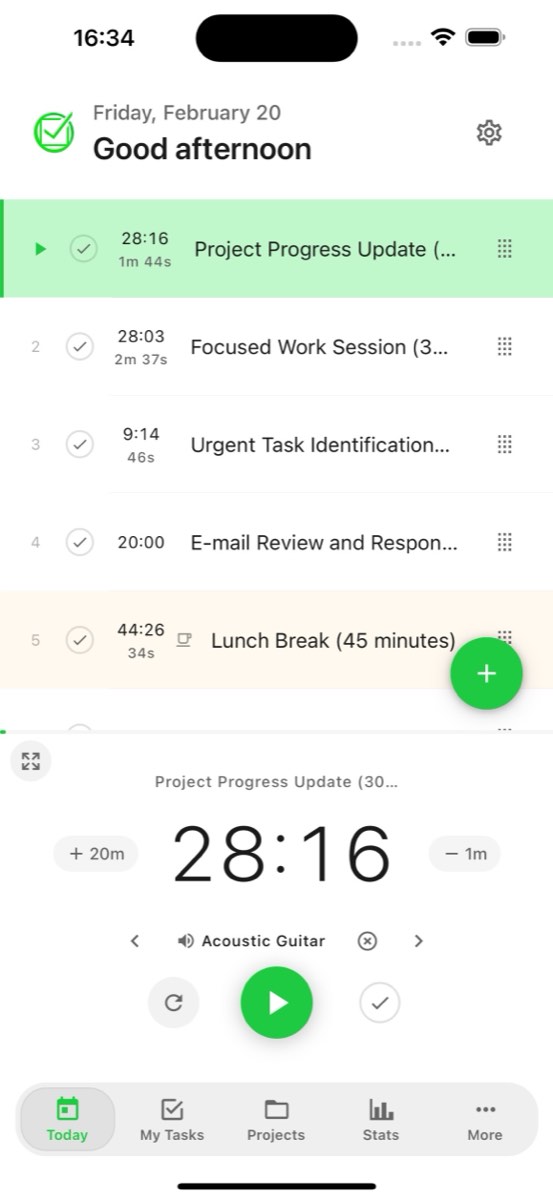
FocusBox is the perfect solution for busy professionals who struggle with procrastination and need to be more productive.
- Free plan, no card needed
- Web and iPhone, always in sync
- Built for ADHD brains

Benefits for Busy Professionals
Efficient, Deadline-Driven, Multitasking, Stressful, Productive
Take Control of Your Time
Increase productivity
FocusBox helps busy professionals increase their productivity by helping them manage their time more effectively and overcome procrastination.
Manage time
FocusBox helps busy professionals take control of their time and get tasks done in less time. They can set goals, track their progress, and get insights into how they are spending their time.

How FocusBox Can Help You Get Tasks Done in Less Time
Benefits for Busy Professionals
Efficient, Deadline-Driven, Multitasking, Stressful, Productive
Take Control of Your Time
Overcome procrastination
FocusBox helps busy professionals overcome procrastination by providing them with a focused and productive environment and by breaking their work into manageable chunks.
Improve focus
FocusBox helps busy professionals improve their focus by providing them with ambient sounds and a pomodoro timer that helps them focus on their work.


Frequently Asked Questions
How does FocusBox help busy professionals stay productive?
FocusBox combines task management with focus tools like Pomodoro timers, ambient sounds, and timeboxing. This helps professionals break large projects into manageable tasks and maintain deep focus throughout the workday.
Can I integrate FocusBox with my existing work tools?
Yes! FocusBox integrates with popular tools like Asana, Jira, ClickUp, Todoist, Notion, and Google Calendar. Import your tasks and manage them in a distraction-free environment.
Is FocusBox suitable for managing multiple projects?
Absolutely. FocusBox Boxes let you organize tasks into separate projects with custom backgrounds, descriptions, and templates. Switch between projects easily and keep everything organized.
How does timeboxing in FocusBox improve my productivity?
Timeboxing assigns a fixed time period to each task, creating urgency and focus. FocusBox timers count down as you work, helping you avoid perfectionism and move through tasks efficiently.
Can I track my productivity over time?
Yes. FocusBox provides detailed stats and insights showing completed tasks, focus time, streaks, and productivity trends. Use these insights to optimize your work habits and schedule.
Does FocusBox work on mobile devices?
Yes! FocusBox has a native iOS app for iPhone and iPad. Your tasks sync automatically between the web app and mobile app, so you can stay productive wherever you are.
Is FocusBox free to use?
FocusBox offers a free plan with one project, one completed task, one AI credit, and the core features. Pro unlocks unlimited projects, AI features, advanced integrations, and more. Pro is free for three days with a card on file, then $8 a month or $60 a year.
How does FocusBox help with procrastination?
FocusBox tackles procrastination with timeboxed sessions that create momentum, ambient sounds that promote focus, celebration animations that reward task completion, and AI-powered task breakdown that makes large tasks feel manageable.